
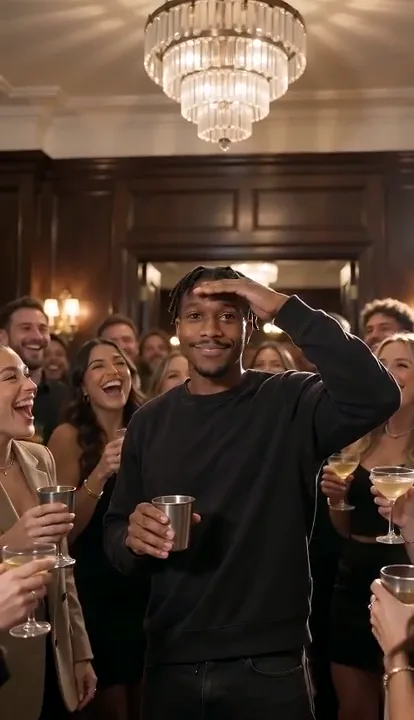
Start with one photoUse a portrait of yourself or your pet
The Drake party trend · Updated October 21, 2026
Burning Bridges AI Video Generator: Host the “Where She At?” Party
Use the Burning Bridges AI video generator to turn one portrait into an original, silent chandelier-party MP4. Choose solo, friends, or Halloween, then review the selected model, supported format, duration, and credit estimate before you create. Start with a photo you have permission to use. The signature beat is a host raising a silver cup, turning to the guests, then shading their eyes to scan the room. Add music through your social app if you want a soundtrack.
Choose your partySolo, friends, or Halloween
Review before you createSee supported settings and credit estimate
Download a silent MP4Add a sound when you post
Make it yours
Build your Burning Bridges party scene
Start with one photo, choose a scene, then review the selected model and credit estimate before you generate.
- 01Add a photoUse a clear image you have permission to animate.
- 02Choose the sceneMake it solo, bring friends, or set a Halloween table.
- 03Check the estimateModel, length, resolution, and credits appear before generation.
Make your own party scene
One photo. Your seat at the table.
A sharp, front-facing portrait gives the host model a clear starting point. The photo stays on your device until you generate.
This model adapts framing to your photo. Use a portrait photo for vertical video or a landscape photo for widescreen.
Estimated cost5s · adaptive frame · Seedance 2.0 Mini49 credits≈ $0.24 at the best current credit-pack rate
The download is silent. Add Drake’s official sound inside TikTok if you want music.
Choose a direction
Burning Bridges AI video examples
These licensed sample clips come from the Renoise Burning Bridges page. They show a few possible results; your video depends on the photo and model you choose.
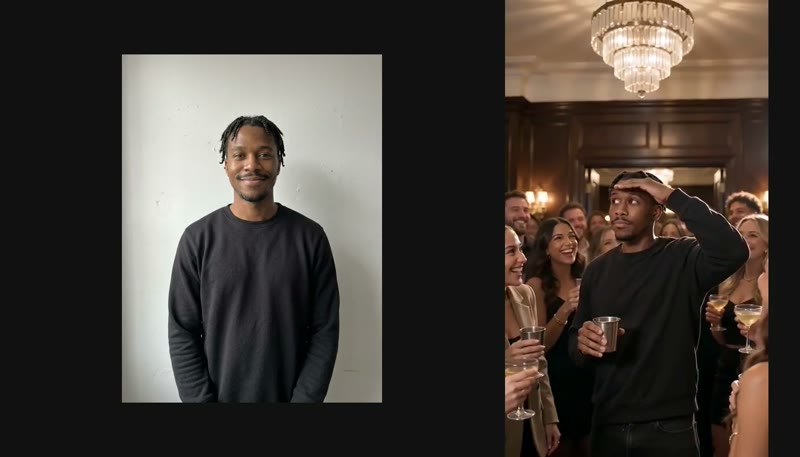
Your portrait takes the host seat
A front-facing portrait moves into the chandelier-lit room, cup in hand, scanning the crowd.
Seedance 2.0 Mini, 480p, 4 seconds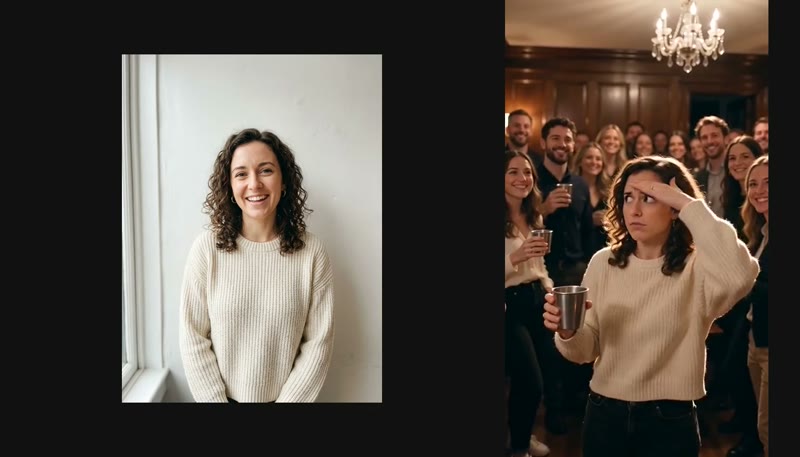
Make the party for a friend
A friend takes the host role while the model fills the room with guests and the signature gesture.
Seedance 2.0 Mini, 480p, 4 seconds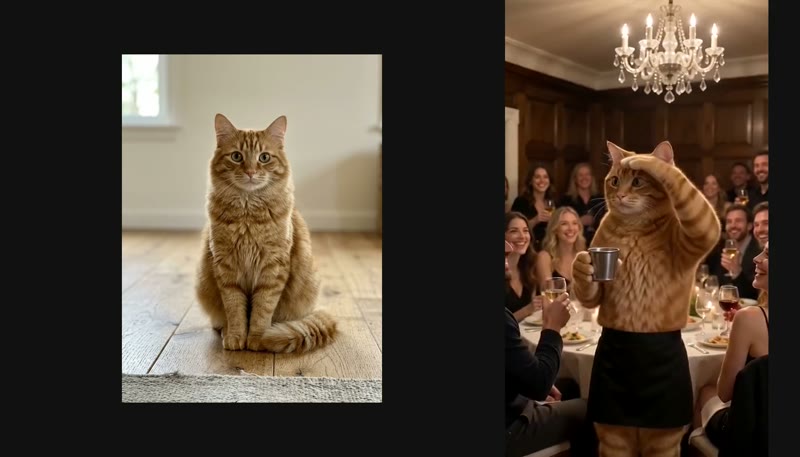
Let your cat host the dinner
A cat joins the same party setup, with a tiny cup and a paw raised to scan the room.
Seedance 2.0 Mini, 480p, 4 seconds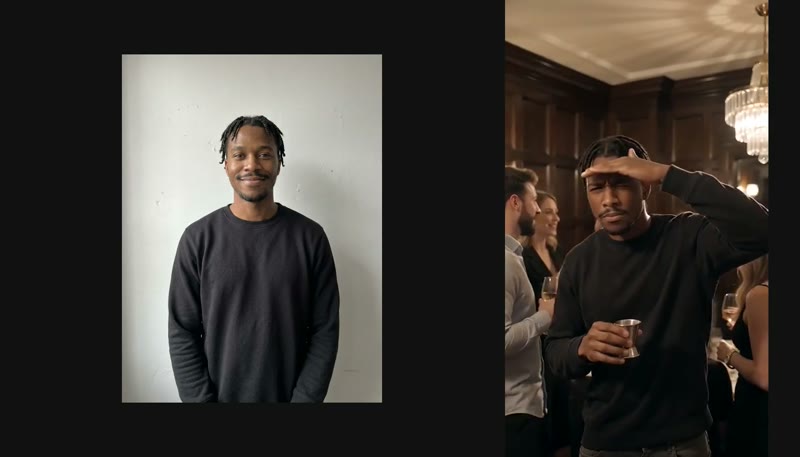
Give the room scan more time
This eight-second example lets the host look across the crowd before waving. Available duration depends on your selected model.
Seedance 2.0 Mini, 480p, 8 secondsThe trend behind the clip
What is the Burning Bridges AI trend?
The Burning Bridges AI trend is a series of short videos that reimagine the dinner-party performance in Drake’s “Burning Bridges” music video. The visual recipe is easy to recognize: a crowded private dining room, warm chandeliers, raised silver cups, a host moving close to the camera, and a hand held above the eyes while they scan the room. Creators replace the host with themselves, a pet, friends, or a fictional cast.
The song
“Burning Bridges” is a Drake song from ICEMAN, released on May 15, 2026. The official music video was published the same day. The AI trend takes its name from the song and reimagines the party scene without using the recording.
The dinner-party scene
The meme comes from the video’s party setting: dark wood, overhead crystal lights, a camera that moves through the guests, and a host who acknowledges the room with a cup in hand. This generator makes a new scene around your photo. It does not use a still, frame, or source-video clip from Drake’s video.
The “Where she at?” gesture
The host’s flat hand above the eyes turns a brief lyric moment into a visual punchline: someone has arrived, someone has not, and the host is checking. AI remakes often build toward this motion, though a model may shorten, change, or skip part of the sequence.
Other names you may see
Searches and captions also call it the Drake Burning Bridges AI video, the “Where she at?” AI video, the Drake dinner-party trend, or the Burning Bridges meme. “Where she at?” by itself can mean the GIF or reaction meme. “BURNIN’ BRIDGES Ai Music” is a separate AI music channel, and other songs or games with “Burning Bridges” in the name are unrelated to this video trend.
Dates with source notes
Burning Bridges AI trend timeline
Official release information is paired with secondary reports about early creator posts and cross-platform reach. Treat creator dates and view totals as estimates: tracker snapshots can count different copies of the same clip, and play counts change over time.
The song and official video are released
Drake’s “Burning Bridges” appears on ICEMAN, with the official music video published the same day.
Official release date · Drake’s official video
An early AI self-insert is reported
A trend tracker lists a Threads post made with Higgsfield Genjutsu as an early dated AI version. The report does not confirm who originated the format.
Secondary report; original post not verified · BurningBridgesVideo timeline
An X self-insert is also reported
RapVideoAI dates an X post by @NEEZY63 to September 23. That report does not establish who started the format.
Secondary report; not an origin claim · RapVideoAI trend page
A side-by-side comparison draws attention
Third-party snapshots put @alex.kuri’s original-versus-AI comparison at roughly 300K–340K plays across different read dates and trackers.
Conflicting snapshots; counts change over time · Jump On The Trend snapshot
The #burningbridgesai label is reported on TikTok
A secondary tracker dates the hashtag’s first appearance to October 7. TikTok’s public counts are not a stable measure of original posts or total reach.
Third-party date; not verified against TikTok history · BurningBridgesVideo citing tracker data
TV-cast remakes spread; growth begins to cool
Jump On The Trend estimated about 20 million cross-platform views by October 20, with a wide 12–35 million range. Its snapshots also showed a large Office repost moving from about 2.7M to 2.8M plays in a day.
Third-party estimate, not a platform-wide count · Jump On The Trend, read October 20
The approximately 20M cross-platform figure is one tracker’s estimate, not an official platform total. Separate snapshots can count the official video and creator reposts differently, so the source and read date matter.
A commonly cited 15-second outline
The Burning Bridges clip, beat by beat
One third-party generator publishes this five-beat sequence for a 15-second remake. Other tools use about 10, 14, 15, 25, or 29 seconds because they select different portions of the source performance or generate a new scene at a different length. The signature scan is the recognizable center beat; it is not a promise that every model will follow exact timecodes.
| Beat | Time | What happens |
|---|---|---|
| The entrance | 0–3.5s | The host leans toward the camera with a cup and catches the lens. |
| Calling out the room | 3.5–7.5s | The host turns toward the guests; the crowd reacts around them. |
| Hand to the lens | 7.5–9.5s | An open hand comes close to the camera as the shot changes. |
| “Where she at?” | 9.5–13s | The host raises a flat hand above the eyes and scans the room. |
| Back to the party | 13–15s | The host waves and steps back toward the guests. |
Why clips have different lengths
A video-to-video tool may map a new face onto an existing source clip, which keeps the source edit’s duration. A one-photo generator builds new motion from an image and a prompt, so its supported duration comes from the selected model. Our control shows the available length and the credit estimate before you submit.
From one photo to a post
How to use the Burning Bridges AI video generator
The generator creates a fresh party scene from one photo. No music-video footage, face-swap source clip, or second person’s face is required.
- 1
Upload one clear photo
Choose a sharp, front-facing photo of yourself or your pet. The generator uses one photo for the host; it does not need a music-video clip or a second person’s image.
- 2
Choose a party direction
Pick a solo host, a party with AI-generated friends in the background, or a Halloween party with original costumed guests.
- 3
Choose a supported format and length
Select a video model, resolution, duration, and a supported aspect ratio when the selected model exposes that setting. Review the credit estimate before generating.
- 4
Generate and download
Confirm you have permission to use the photo, generate the silent MP4, then preview or download it when the task finishes.
- 5
Add the official sound in TikTok
If you want the song, add “Burning Bridges” from TikTok’s own music picker and use the platform’s AI-generated-content label when required.
Post it on TikTok
Upload the silent MP4, open TikTok’s sound picker, and search for the official “Burning Bridges” sound. Using the platform’s sound page helps connect a post to that sound where the platform supports it. Add #burningbridgesai if it accurately describes the video, and use TikTok’s AI-generated-content label when its current rules require one. Availability and music rights depend on the account, region, and platform terms.
A seasonal party preset
Halloween Burning Bridges: the horror-party version
The Halloween preset keeps the uploaded host in the center and asks the model to create original costumed guests around them: friendly ghosts, skeletons, vampires, or other generic monsters. It does not use named horror characters. The photo still supplies the host; crowd styling comes from the text prompt and the selected video model.
Use a clear portrait with the face visible and leave room around the head so the hand-over-eyes gesture has space. The model may change costume details or guest count. For a different Halloween AI video direction, see Spooky Scary Skeletons AI.
Help the model keep the host recognizable
Photo tips for a clearer result
Face the camera
Start with a sharp, front-facing portrait in even light. The final gesture raises a hand near the eyes, so a clear view of the face before generation gives the model more visual information to work with.
Keep the face uncovered
Avoid masks, heavy shadows, and objects across the eyes. Glasses or hats can change during generation, and sunglasses hide the eye area that anchors the scanning gesture.
Use a photo you can share
Upload only yourself or an adult who gave permission. Do not use a public figure’s photo, a minor’s photo, a music-video frame, or an image whose rights you do not have. The consent control records your confirmation; it does not identify every face or verify a person’s age automatically.
Let the model set the wardrobe
A prompt may describe a dark jacket, silver cup, and warm dining-room light, but each video model interprets clothing and props differently. Review the preview before posting and avoid claims that every output will match the reference music video.
Make the joke your own
Burning Bridges AI ideas and captions
- Looking for someone: “Me at the party looking for the friend who said they were coming.”
- Birthday dinner: “The host checking whether the birthday cake made it out of the car.”
- Office party: “Me at 9:01 looking for whoever booked this meeting.”
- Original versus AI: Use TikTok’s split-screen or green-screen editor to compare your own generated version with a licensed or platform-provided reference. Do not repost music-video footage without permission.
A short caption works best when it explains who the host is looking for. Keep the joke original, label AI content when required, and use only music and video material you are allowed to post.
For DIY and prompt-based tools
Make it yourself: Burning Bridges AI prompt, Higgsfield, and CapCut
A text-to-video or image-to-video prompt can describe the room, crowd, gestures, and camera movement without asking a tool to reproduce the music video frame for frame. Here is an original prompt you can adapt:
A person from the reference photo hosts a crowded private dinner party in a dark wood dining room under crystal chandeliers. Guests raise silver cups behind them. The host lifts a cup, points at the camera, turns to acknowledge the crowd, brings an open palm near the lens, then holds a flat hand above their eyes to scan the room before waving and stepping back into the party. Warm low light, handheld camera, natural motion, face kept clear. Create a new scene; do not reproduce a music-video frame, real celebrity, logo, or song.Video-to-video versus one-photo generation
A video-to-video workflow starts with a source clip and attempts to preserve its movement. That may require footage rights and can reproduce the original recording or identifiable people. A one-photo workflow starts from a still image and creates a new scene. A CapCut template or manual edit is a separate option; its availability and included audio can change over time.
Higgsfield and similar tools can expose different model modes and policies. Check the current tool’s source-video rules before uploading a clip. The prompt above does not include a Drake likeness, the original soundtrack, or protected character names.
Search clarification
What Burning Bridges AI is not
| Search phrase | What it may mean | Trend match |
|---|---|---|
| “Burning Bridges AI music”, “AI song”, or “AI band” | A separate channel named “BURNIN’ BRIDGES Ai Music” and other music-generation results. | No |
| “Where she at” Drake GIF or meme | The hand-over-the-eyes reaction gesture and related GIFs or posts. | Only as trend context |
| Other “Burning Bridges” songs or a game | Unrelated songs, games, and phrases that share the same name. | No |
| Drake dinner-party AI video | A new short video that puts a different host into a party-inspired scene. | Yes |
Snapshot dated October 20, 2026
Is the Burning Bridges AI trend over?
The available third-party snapshot points to a trend that was slowing by October 20, not a confirmed end. Jump On The Trend estimated about 20M cross-platform plays, with a wide 12M–35M range, and reported only about 0.1M additional plays for one large Office repost between October 19 and 20. Halloween party remakes were still being surfaced by that tracker.
The estimate is not a deduplicated count from TikTok, Reels, and Shorts. The tracker’s read date is October 20, 2026, and its totals can differ from later snapshots or platform counters.
Check before you submit
What a Burning Bridges AI video costs
The cost depends on the active model, resolution, and length. The generator shows the exact credit estimate before you submit. It also shows an approximate dollar value calculated at the lowest current one-time credit-pack rate; your actual checkout amount depends on the pack you choose. See the pricing page for current bundles and refund terms.
Failed or canceled tasks are eligible for the task service’s credit-refund handling after the status is reconciled. Content-safety or copyright rejections may be excluded. A pending task is not a failed task; check the task status or My videos before starting another run.
Straight answers
Burning Bridges AI FAQ
What is the Burning Bridges AI trend?
It is a short-form AI video trend that reimagines the chandelier-lit dinner-party scene from Drake’s “Burning Bridges” music video. Creators put themselves, pets, friends, or fictional casts in the host’s place and often recreate the hand-over-the-eyes “Where she at?” gesture. Our generator makes a new party scene from your photo; it does not edit the original video.
What song is used in the Burning Bridges AI videos?
The trend references Drake’s “Burning Bridges,” released on the ICEMAN album on May 15, 2026. This generator exports without the song. Add the official sound from TikTok or Instagram’s music library if you want it in a post.
What does “Where she at?” mean in the trend?
It refers to the host’s gesture of holding a flat hand above the eyes and scanning the room as if looking for someone. AI versions use that beat as a recognizable closing moment; the exact motion can vary with the selected model.
Who started the Burning Bridges AI trend?
No single originator has been confirmed. Secondary reports place an early dated Threads example on September 19, 2026, followed by an X self-insert post later that month. A trend tracker dates the #burningbridgesai hashtag on TikTok to October 7.
How many photos do I need?
One clear photo of the host is enough. The Friends preset adds an AI-generated crowd in the background; it does not copy your friends’ faces from additional photos.
Can I make a Halloween or pet version?
Yes. Choose Halloween party for original, generic costumed guests, or upload a clear pet photo to make your pet the host. Animal detail and motion can vary by model.
Does the video include Drake’s song?
No. The generated MP4 is silent and does not contain the original recording. Add the official “Burning Bridges” sound inside TikTok or Instagram if you have permission to use it there.
Can I make a vertical Burning Bridges AI video for TikTok?
Choose 9:16 when the selected model supports an explicit aspect ratio. Some image-to-video models adapt the frame to the uploaded photo, so start with a portrait photo for vertical framing or a landscape photo for 16:9.
Is this the official Drake video or an official app?
No. TrendingAI.video is independent and is not affiliated with Drake, OVO, Republic Records, or Universal Music. The generator creates a new scene and does not use the official video, Drake’s likeness, voice, or music.
Can I upload Drake, another celebrity, or a music-video frame?
No. Upload only your own photo or an image of an adult who agreed to appear. Do not upload public figures, minors, or screenshots and footage from a music video.
Cup up. Your party, your crew.
Host the “Where She At?” party from one photo.
Choose a preset, review the current model cost, and make a new silent clip to share.
Make my Burning Bridges AI video